


喜讯:国内、香港、海外云服务器租用特惠活动,2核/4G/10M仅需31元每月,点击抢购>>>
 点击这里进入阿里云ECS官方页面,立即免费体验云服务器ECS>>>
阿里云服务器ECS使用教程-部署LAMP环境(Ubuntu 20)
LAMP环境是常用的Web开发环境之一,其中LAMP分别代表Linux、Apache、MySQL和PHP。本文将介绍如何在Ubuntu操作系统的ECS实例内部署LAMP环境。
已创建ECS实例并为实例分配公网IP地址。具体操作,请参见自定义购买实例。 本文示例步骤中,使用以下配置的ECS实例。实际操作时,建议您保持操作系统版本一致,避免因操作系统版本问题导致的命令执行报错。 实例规格:ecs.c6.large 操作系统:公共镜像Ubuntu 20.04 64位 网络类型:专有网络VPC IP地址:公网IP 已在实例安全组的入方向添加安全组规则并放行22、80端口。具体操作请参见添加安全组规则。 本文适用于熟悉Linux操作系统,初次使用阿里云进行建站的个人用户。在示例步骤中使用了以下版本的软件。操作时,请您以实际软件版本为准。 Apache:2.4.41 MySQL:8.0.29 PHP:7.4.3 远程连接需要部署LAMP环境的ECS实例。 具体操作,请参见连接方式概述。 关闭系统内部防火墙。 如果防火墙状态为Status: inactive,则表示防火墙为关闭状态。 如果防火墙状态为Status: active,则表示防火墙为开启状态。 运行以下命令,检查防火墙当前状态。 可选:关闭防火墙。 如果您的防火墙为开启状态,需要运行以下命令,关闭防火墙并关闭开机自启动防火墙。 说明 如果您想重新开启防火墙并开启开机自启动防火墙,请运行sudo ufw enable命令。 运行以下命令,更新Ubuntu系统内的软件包。 运行以下命令,安装Apache。 运行以下命令,查看Apache版本。 返回结果如下所示,表示Apache已成功安装,Apache的版本为2.4.41。 运行以下命令,启动Apache服务并设置服务开机自启动。 在本地Windows主机或其他具备公网访问能力的主机中,通过浏览器访问 如果您访问到如下Apache默认首页信息,则表示Apache服务处于正常运行状态。 安装MySQL。 运行以下命令,安装MySQL。 运行以下命令,查看MySQL版本。 返回结果类似如下所示,表示MySQL已成功安装,MySQL的版本为8.0.29。 运行以下命令,启动MySQL服务。 配置MySQL。 输入root用户的密码。本示例中输入 说明 在输入密码时,系统为了最大限度的保证数据安全,命令行将不做任何回显。您只需要输入正确的密码信息,然后按Enter键即可。 输入Y,设置密码验证策略。 选择密码验证策略。 本示例输入0。 输入Y,更改root用户密码。 输入root用户密码。 输入Y,确认使用已设置的密码。 输入Y删除MySQL自带的匿名用户。 输入Y,禁止MySQL的root用户的远程登录权限。 输入Y,移除test数据库。 输入推荐:TOP云智能建站优惠活动,仅880元即可搭建一个后台管理五端合一的智能网站(PC网站、手机网站、百度智能小程序、微信小程序、支付宝小程序),独享百度搜索SEO优势资源,让你的网站不仅有颜值有排面,更有排名,可以实实在在为您带来效益,请点击进入TOP云智能建站>>>,或咨询在线客服了解详情。前提条件
背景信息
步骤一:准备工作
sudo ufw status
sudo ufw disable
步骤二:安装Apache
sudo apt update
sudo apt-get -y install apache2
apache2 -v
Server version: Apache/2.4.41 (Ubuntu)
Server built:   2022-01-05T14:49:56
sudo systemctl start apache2
http://<ECS实例公网IP地址>。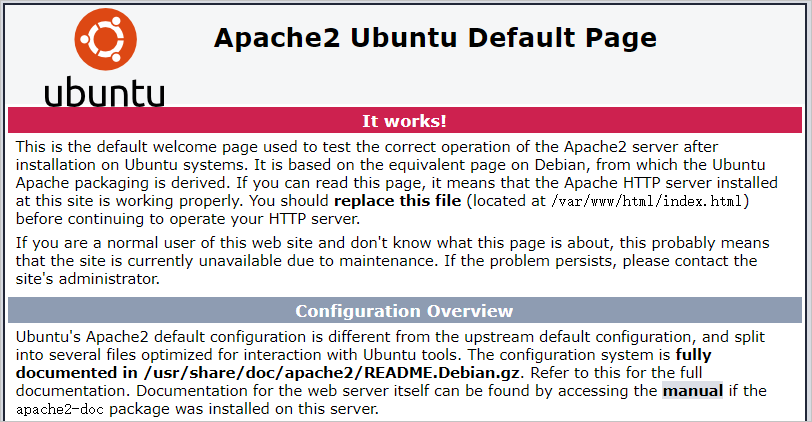
步骤三:安装并配置MySQL
sudo apt -y install mysql-server
sudo mysql -V
mysql Ver 8.0.29-0ubuntu0.20.04.3 for Linux on x86_64 ((Ubuntu))
sudo systemctl start mysql
Mysql@1234。ecs-user@iZbp19jsi7s0g7m4zgc****:~# sudo mysql_secure_installation
Securing the MySQL server deployment.
Enter password for user root:
VALIDATE PASSWORD COMPONENT can be used to test passwords
and improve security. It checks the strength of password
and allows the users to set only those passwords which are
secure enough. Would you like to setup VALIDATE PASSWORD component?

Press y|Y for Yes, any other key for No: Y
There are three levels of password validation policy:

LOW Length >= 8
MEDIUM Length >= 8, numeric, mixed case, and special characters
STRONG Length >= 8, numeric, mixed case, special characters and dictionary file

Please enter 0 = LOW, 1 = MEDIUM and 2 = STRONG: 0
Change the password for root ? ((Press y|Y for Yes, any other key for No) : Y
New password:

Re-enter new password:

Estimated strength of the password: 100
Do you wish to continue with the password provided?(Press y|Y for Yes, any other key for No) : Y
By default, a MySQL installation has an anonymous user,
allowing anyone to log into MySQL without having to have
a user account created for them. This is intended only for
testing, and to make the installation go a bit smoother.
You should remove them before moving into a production
environment.

Remove anonymous users? (Press y|Y for Yes, any other key for No) : Y
Normally, root should only be allowed to connect from
'localhost'. This ensures that someone cannot guess at
the root password from the network.

Disallow root login remotely? (Press y|Y for Yes, any other key for No) : Y
By default, MySQL comes with a database named 'test' that
anyone can access. This is also intended only for testing,
and should be removed before moving into a production
environment.


Remove test database and access to it? (Press y|Y for Yes, any other key for No) :

 湘公网安备43019002001857号
 备案号:
备案号: 客服1
客服1