


喜讯:国内、香港、海外云服务器租用特惠活动,2核/4G/10M仅需31元每月,点击抢购>>>
点击这里注册天翼云特邀VIP帐号,立即体验天翼云对象存储>>>
天翼云对象存储(融合版)数据安全教程-STS角色管理
介绍配置STS角色管理的具体步骤。
对象存储(融合版)提供STS角色管理功能,无需向临时用户透露您的长期密钥,您可以为临时用户颁发一个自定义时效和权限的访问凭证,使您的资源访问更加安全。
温馨提示:使用STS授权访问时,请务必按照业务情况,以最细粒度的权限原则进行授权,避免放大临时用户的权限,保证资源访问安全。
目前开放本功能的区域:天津资源池1区,江西资源池1区,陕西资源池1区,贵州资源池1区,河北资源池1区,内蒙古资源池1区,广东资源池1区,山西资源池1区,云南资源池1区,吉林资源池1区。
通过控制台创建STS角色
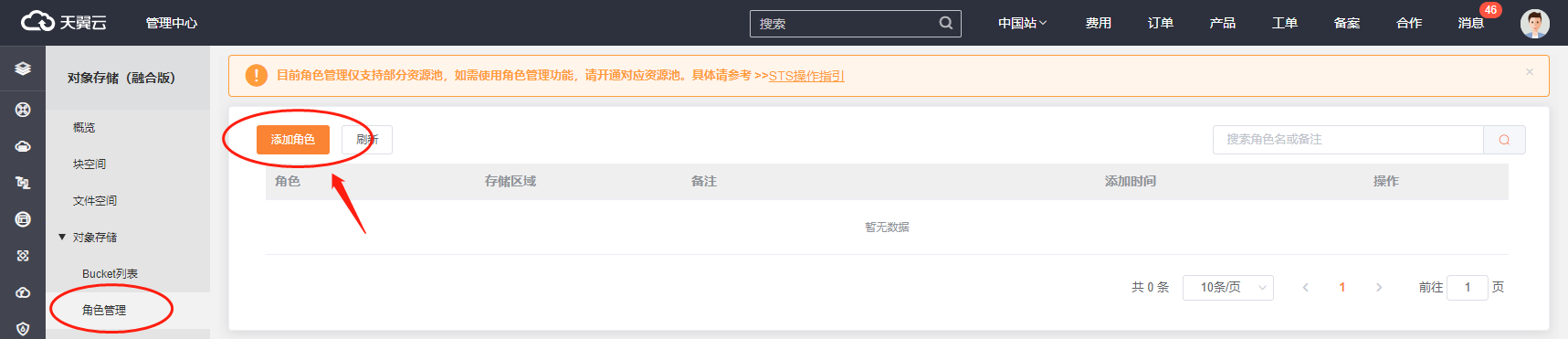
进入对象存储控制台,进入【角色管理】 菜单,点击【添加角色】,进行角色添加。
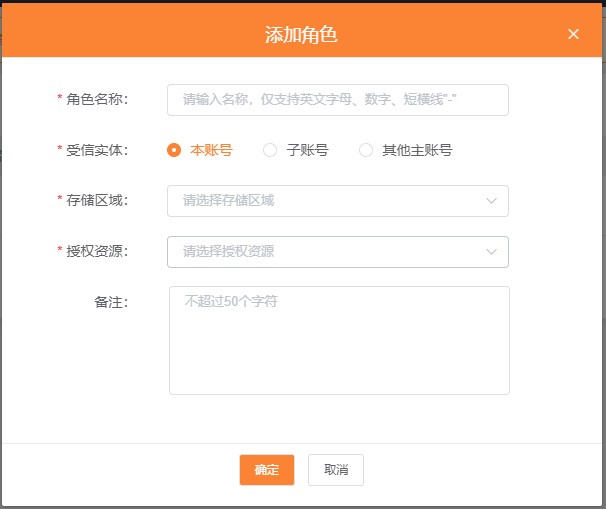
在添加角色弹窗,填写角色名称、选择受信实体、存储区域、授权资源后,完成创建。
获取角色ARN信息
进入对象存储控制台,进入【角色管理】 菜单。
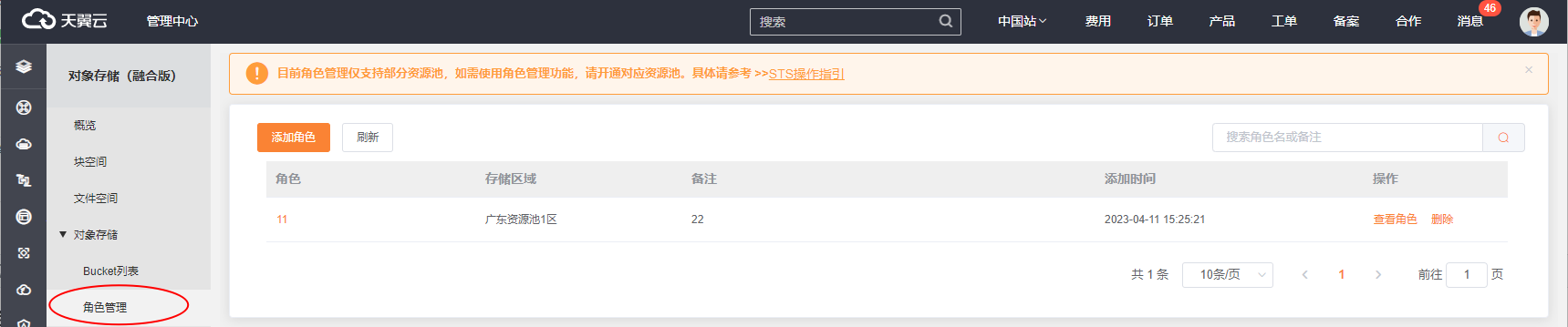
找到对应的角色,点击操作列的【查看角色】按钮。
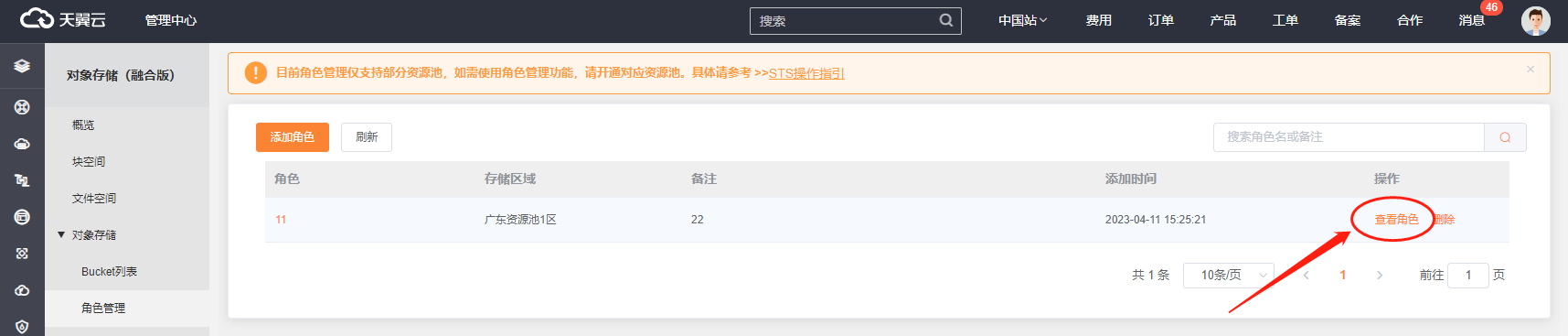
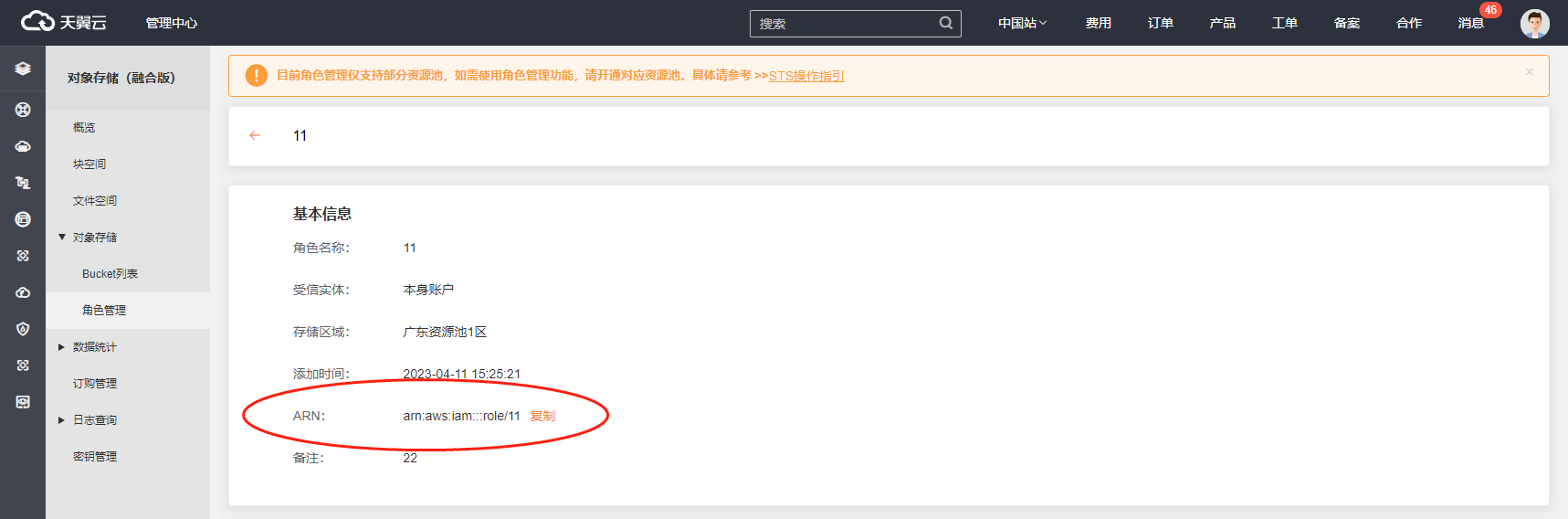
进入角色详情页面,可获取对应的arn信息,用以获取STS临时密钥。
获取STS临时密钥
获取STS临时密钥,具体可参照如下java示例:
// STS endPoint
String endPoint = "";
// 在对象存储控制台访问密钥AccessKey和SecretKey。
String accessKey = "";
String secretKey = "";
// 填写步骤一获取的角色ARN。
String roleArn = "";
// 设置临时访问凭证的名称.
String roleSessionName = "";
// 设置 Policy 允许上传对象
String policy = "{"Version":"2012-10-17"," + ""Statement":[" + "{"Effect":"Allow","
            + ""Action":["s3:PutObject"],"

            + ""Resource":["arn:aws:s3:::<bucket-name>/*"]}" + "]}";
// 创建STS Client
BasicAWSCredentials basicAWSCredentials = new BasicAWSCredentials(accessKey, secretKey);
AwsClientBuilder.EndpointConfiguration endpointConfiguration = new AwsClientBuilder.EndpointConfiguration(endPoint, "");
AWSSecurityTokenService stsClient = AWSSecurityTokenServiceClientBuilder.standard()
    .withCredentials(new AWSStaticCredentialsProvider(basicAWSCredentials))

    .withEndpointConfiguration(endpointConfiguration)

    .build();
AssumeRoleRequest assumeRoleRequest = new AssumeRoleRequest();
assumeRoleRequest.setRoleArn(roleArn);
assumeRoleRequest.setRoleSessionName(roleSessionName);
assumeRoleRequest.setPolicy(policy);
AssumeRoleResult assumeRoleRes = stsClient.assumeRole(assumeRoleRequest);
Credentials stsCredentials = assumeRoleRes.getCredentials();
System.out.println("Expiration: " + stsCredentials.getExpiration());
System.out.println("Access Key Id: " + stsCredentials.getAccessKeyId());
System.out.println("Access Key Secret: " + stsCredentials.getSecretAccessKey());
System.out.println("Security Token: " + stsCredentials.getSessionToken());
步骤三:通过临时密钥访问对象存储资源
// 从AssumeRole获取AccessKeyId,SecretAccessKey与SessionToken,创建S3 Client
BasicSessionCredentials basicSessionCredentials = new BasicSessionCredentials(stsCredentials.getAccessKeyId(),
stsCredentials.getSecretAccessKey(), stsCredentials.getSessionToken());
AmazonS3 s3 = AmazonS3ClientBuilder.standard()
	.withCredentials(new AWSStaticCredentialsProvider(basicSessionCredentials))

	.withEndpointConfiguration(endpointConfiguration).withChunkedEncodingDisabled(true).build();
// 上传对象至桶
PutObjectResult result = s3.putObject("", "", new File("/path/to/file"));
System.out.println(result);
推荐:TOP云智能建站优惠活动,仅880元即可搭建一个后台管理五端合一的智能网站(PC网站、手机网站、百度智能小程序、微信小程序、支付宝小程序),独享百度搜索SEO优势资源,让你的网站不仅有颜值有排面,更有排名,可以实实在在为您带来效益,请点击进入TOP云智能建站>>>,或咨询在线客服了解详情。
 湘公网安备43019002001857号
 备案号:
备案号: 客服1
客服1